
Freshsales to Zoho CRM Migration Services
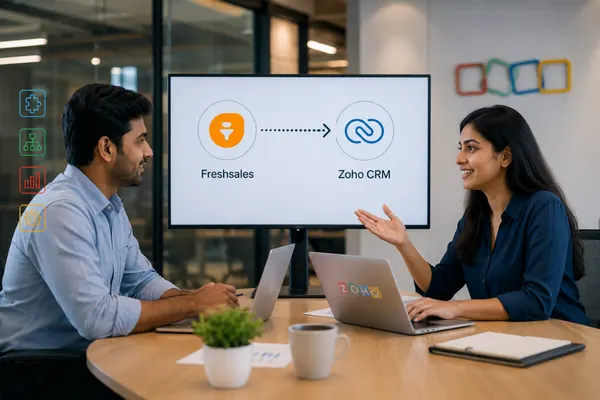
Freshsales and Zoho CRM are structured similarly enough β Contacts, Accounts, Deals, pipeline stages β that a Freshsales to Zoho CRM migration looks deceptively simple on paper. It isnβt. Pipeline stage values that donβt match exactly can cause deals to import blank, activity types get flattened during export, and Freddy AI configurations have no automatic equivalent in Zohoβs Zia β they have to be rebuilt by someone who knows both platforms.
Techvaria migrates businesses from Freshsales to Zoho CRM with that reality built into the process. As a Certified Zoho Premium Partner, we handle the data audit, field mapping, migration, workflow reconstruction, and validation, so your sales team inherits a CRM that works the way Freshsales did β not a set of records they have to reorganize before they can trust it.
Home / Freshsales to Zoho CRM Migration Services
Why Businesses Are Moving From Freshsales to Zoho CRM
Freshsales works well for growing sales teams, but businesses often consider Freshsales to Zoho CRM migration as their sales operations become more complex. Teams may need deeper CRM customization, advanced automation, territory management, detailed reporting, or stronger integration across sales and business functions.
More flexible customization: Zoho CRM provides custom modules, Blueprint, Deluge automation, and flexible workflows for more complex sales processes.
Connected business applications: Zoho CRM can connect sales with other Zoho applications, helping businesses reduce fragmented processes across CRM, marketing, finance, support, and operations.
Advanced reporting and automation: Businesses moving from Freshsales may benefit from broader reporting, workflow automation, forecasting, and AI-assisted capabilities through Zoho CRM and its connected applications.
Better fit for growing operations: As teams add users, products, territories, processes, and integrations, Zoho CRM provides a broader platform for managing increasingly complex sales operations.
The goal is not simply to replace Freshsales β it is to migrate to Zoho CRM with the right structure, automation, and data continuity.
Common Freshsales to Zoho Migration Pitfalls
A Freshsales to Zoho CRM migration involves more than exporting records and importing them into a new system. Differences in field structures, pipelines, activities, automation, and integrations can create data quality issues if they are not mapped before migration.
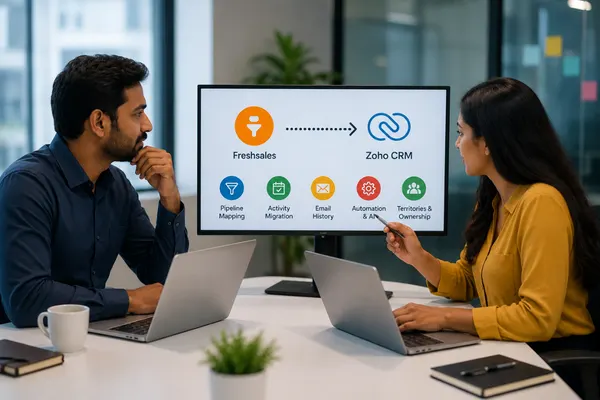
Pipeline mapping: Freshsales deal stages and Zoho CRM pipeline values must be reviewed and mapped correctly to preserve sales reporting.
Activity migration: Calls, tasks, meetings, and appointments should be mapped carefully so important sales activity remains associated with the correct records.
Email history: Email conversations and historical communication may require separate validation because not all source-system history transfers in the same structure.
Automation and AI: Freshsales workflows, assignment rules, scoring, and Freddy AI configurations may need to be rebuilt or reconfigured in Zoho CRM.
Territories and ownership: User roles, record ownership, and territory rules should be validated before go-live.
A structured Freshsales data migration process helps protect data accuracy and reduce disruption.
Our Freshsales to Zoho CRM Migration Process
We run every Freshsales migration through five phases. The structure exists specifically because the two platforms look similar enough on the surface that migrations get rushed β and thatβs exactly where pipeline stages and activity data quietly break.
1. Discovery & Freshsales Audit
We map your Freshsales environment β Contacts, Accounts, Deals, custom fields, pipeline stages, active workflows, and any Freddy AI scoring or automation in use. We also review connected integrations (email, telephony, Freshmarketer if in use) and run a data-quality pass to flag duplicates and incomplete records before anything moves.
2. Object & Field Mapping
Freshsales and Zoho CRM share a broadly similar structure, but the details differ enough to cause problems if mapped carelessly. Pipeline stage names and values are matched deliberately β a mismatch here is one of the most common reasons deals import with blank or incorrect stage data. Freshsalesβ Appointments map to Zohoβs Events, and activity types are re-mapped individually rather than flattened into a single generic activity type, which is a common failure point in unmanaged migrations.
3. Data Migration & Import
Records import in sequence β Users, Accounts, Contacts, Deals, then Tasks, Meetings, Calls, and Notes β so relationships stay intact. Custom modules in Freshsales donβt have an automatic import path into Zoho and are rebuilt manually as Zoho custom modules with equivalent fields and relationships. Attachments are migrated as a distinct step with verification against source file counts.
4. Automation & AI Reconstruction
Workflows and assignment rules are rebuilt natively as Zoho Workflow Rules and Blueprints. Where Freddy AI scoring or automation was in use, we recreate equivalent logic using Ziaβs scoring rules and Zohoβs automation tools β this isnβt a direct import, so we treat it as a deliberate build step, not something that happens automatically during data migration.
5. Validation & Go-Live
Before cutover, we reconcile record counts between Freshsales and Zoho, verify pipeline stage and deal data landed correctly, and test rebuilt workflows and automations against real scenarios. Your team gets trained on Zoho CRM specifically in the context of how your sales process now works there, and we stay engaged through a defined hypercare period after go-live.
What Gets Migrated: Freshsales to Zoho CRM Object Mapping
| Freshsales Object | Zoho CRM Equivalent | Migration Notes |
|---|---|---|
| Contacts | Contacts | Custom fields re-mapped individually |
| Accounts | Accounts | Account-contact relationships preserved |
| Deals | Deals | Pipeline stage values matched deliberately to avoid blank imports |
| Leads | Leads | Lead source and custom field values carried over |
| Appointments | Events | Re-mapped rather than flattened into a generic activity type |
| Tasks & Calls | Tasks & Calls | Logged against the correct parent record with original timestamps |
| Notes | Notes | Attached to the correct Contact, Account, or Deal |
| Products & Quotes | Products & Quotes | Migrated with pricing and line-item structure intact |
| Custom Modules | Custom Modules | Rebuilt manually β not supported in direct API migration |
| Workflows & Assignment Rules | Workflow Rules / Blueprint | Recreated to match original logic |
| Freddy AI Scoring | Zia Scoring Rules | Rebuilt, not imported β requires deliberate reconstruction |
| Territory Rules | Territory Management (Zoho CRM) | Reconfigured manually to match original territory logic |
We scope how much historical deal and activity data actually needs to migrate β active pipelines and recent history are usually essential; older closed records can often be archived separately rather than migrated in full.
Freshsales to Zoho CRM Migration Cost & Timeline
Cost and timeline depend on your data volume, how many custom modules and workflows need rebuilding, and how much Freddy AI or Freshmarketer functionality needs a Zoho equivalent.
What drives the cost:
- Record volume β a database under 5,000 records migrates differently than one in the tens of thousands
- Custom modules and fields β these require manual reconstruction, not a direct import
- Automation and AI reconstruction β rebuilding Freddy-based scoring and workflows in Zia and Zoho Workflow Rules
- Integrations β telephony, email, and Freshmarketer (if in use) need to be reconnected and tested against Zoho
- User count β training scales with team size
Rough guide by business size:
- Small teams (under 5,000 records, minimal customization): typically one to two weeks
- Mid-sized businesses (5,000β30,000 records, several workflows and integrations): usually two to four weeks
- Larger organizations (30,000+ records, heavy customization, AI/automation rebuild): typically four to six weeks
On licensing, Zoho CRMβs per-user pricing is generally lower than Freshsalesβ at comparable Professional and Enterprise tiers, though Freshsales can start slightly cheaper at entry-level plans β the right comparison depends on your team size and which tier youβd actually need on each platform, including how AI features are priced at your headcount. We give you an exact quote and timeline after the discovery audit, not a generic number that ignores your actual customization and automation footprint.
How We Minimize Downtime and Risk
Because the two platforms look alike, the temptation is to rush the cutover. These are the practices that keep the switch uneventful.
Freshsales stays live during the build
We build and test your Zoho CRM environment in parallel while your team keeps working in Freshsales as normal.
We test rebuilt automation before cutover
Workflows, assignment rules, and Zia scoring logic are tested against real scenarios, not just reviewed on paper, so we catch mismatches before your team relies on them.
We schedule a short, defined cutover window
Freshsales updates are frozen only briefly, immediately before go-live, to avoid records being created or edited mid-migration and missed in the final sync.
We keep Freshsales accessible through validation
Access isnβt cut the moment Zoho goes live β it stays available through validation and hypercare as a reference and fallback.
Post-Migration Support
Go-live is the start of adoption, not the end of the project.
Data validation
Record counts, pipeline stage accuracy, and field data checked against the original Freshsales environment.
Team training
Sales and admin users walked through Zoho CRM specifically in the context of how your pipeline and automation now work there.
Hypercare period
Active support after go-live to catch anything that only surfaces under real usage.
Ongoing Zoho support
Further configuration, integration, and optimization of Zoho CRM as your usage matures, including connecting Zoho Marketing Automation if youβre consolidating away from a separate marketing tool.
Ready to Move Off Freshsales?
Why Businesses Choose Techvaria for Freshsales to Zoho Migration
We know where Freshsales-to-Zoho migrations actually break. Pipeline stage mapping, activity type flattening, and AI reconstruction arenβt edge cases we discover mid-project β theyβre built into how we scope every migration from the start, because the platformsβ surface-level similarity is exactly what causes rushed migrations to go wrong.
Weβre a Certified Zoho Premium Partner beyond migration. We implement and support Zoho CRM, Zoho Marketing Automation, and the wider Zoho One suite, so the environment we migrate you into is built and supported by the same team afterward.
We scope migrations to what your business actually needs. Not every business needs its full Freshsales history migrated in detail. We help you decide what needs to be live versus archived, keeping cost and project risk proportional to real business need.
We serve businesses across India. We run migrations remotely with the same process discipline for teams anywhere in the country, with on-site engagement available where it adds value. This page sits within our wider Zoho migration services, alongside Salesforce, HubSpot and Tally to Zoho Books migrations.
Hear From Our Clients
Industries We Migrate From Freshsales
Frequently Asked Questions
It depends on your record volume and how much customization and automation needs rebuilding. A small team with under 5,000 records and minimal customization can migrate in one to two weeks. A larger organization with custom modules, workflows, and Freddy AI logic to rebuild typically takes four to six weeks. We give a firm timeline after the discovery audit.
It will if the pipeline stages are mapped deliberately before import β this is actually one of the most common failure points in Freshsales-to-Zoho migrations, since a stage name or value mismatch can cause deals to land with blank or default stage data. We match your Freshsales pipeline stages to Zohoβs configuration as a dedicated step before any deal records move.
Thereβs no automatic import path for Freddy AI configurations. We document how your scoring model works in Freshsales and rebuild equivalent logic using Ziaβs scoring rules in Zoho CRM, so sales continues working from comparable prioritization after migration.
Yes. We build and test the Zoho CRM environment in parallel while your team continues working in Freshsales. Freshsales is only frozen for a short, scheduled window immediately before cutover.
Custom modules donβt transfer through a direct API-based migration β they need to be rebuilt manually. We recreate them as Zoho custom modules with equivalent fields and relationships as part of the migration scope, rather than leaving this for your team to discover is missing after go-live.
Cost depends on your record volume, the number of custom modules and workflows that need rebuilding, and whether Freddy AI or Freshmarketer functionality needs a Zoho equivalent built. We provide an exact quote after the discovery audit rather than a flat rate.
Freshmarketer functionality (email campaigns, landing pages, lead nurturing) has a native equivalent in Zoho Marketing Automation, which connects directly to Zoho CRM. We scope this as part of the migration if your business is consolidating both sales and marketing tools onto Zoho.
Not necessarily riskier, but the risks are different. Because Freshsales and Zoho CRM share a broadly similar structure, itβs tempting to treat the migration as a simple export-import job β which is exactly how pipeline stage mismatches and flattened activity data slip through. Structural similarity reduces some risks and creates others if the migration isnβt handled deliberately.