

When Off-the-Shelf Software Doesn’t Fit Your Business
Most businesses discover the limits of packaged software gradually. The product does eighty percent of what is needed, so the remaining twenty percent moves into spreadsheets, email threads, and WhatsApp groups. Nobody decides this — it accumulates. Eventually the workarounds carry more operational weight than the software does, and the question becomes whether to keep absorbing that cost or build something that fits. This page sets out how to recognise that point, how to tell a genuine fit problem from a configuration problem, and what the alternatives actually involve.
Home / When Off-the-Shelf Software Doesn’t Fit Your Business
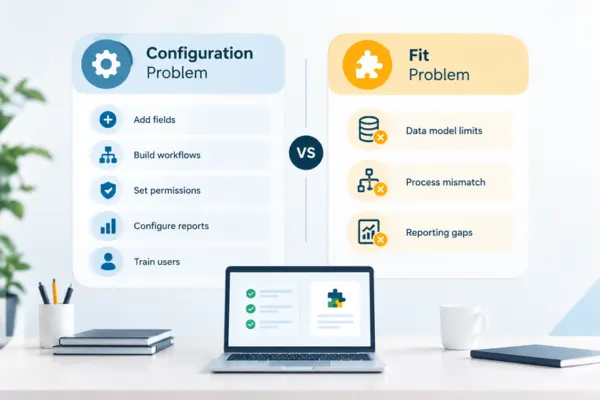
The Difference Between a Configuration Problem and a Fit Problem
Not every complaint about packaged software justifies replacing it, and this distinction is worth getting right before spending money. A configuration problem is one where the software can do what you need but has not been set up to — fields not created, workflows not built, permissions not scoped, reports not configured, or users never properly trained. These are common, and they are considerably cheaper to fix than to replace. A genuine fit problem is structural: the software’s data model cannot represent something your business needs to track, the workflow it enforces contradicts how your process actually runs, or the reporting your management needs cannot be produced because the underlying data is not captured in a usable form.
The tell is usually in what the workaround looks like. If the workaround is people entering data twice, the problem is often integration or configuration. If the workaround is an entire process running outside the system because the system has nowhere to put it, that is structural — and no amount of configuration will resolve it. Businesses in distribution, manufacturing, professional services, and field operations hit structural limits most often, because their operating models involve process shapes that horizontal products were never designed to hold.
Business Challenges We Solve
The symptoms are recognisable and consistent. A spreadsheet that everyone knows is the real system of record, maintained in parallel with the software that is supposed to be. Data entered twice because two systems that must agree do not talk to each other. A process running through email approvals because the software cannot route them by the rules your business actually uses. Reports assembled manually every month because the data needed to produce them lives in three places. A field or category tracked in a text note because there is no proper place for it. Custom fields stretched to hold something they were never intended for, with a convention only two people understand. Staff who have learned the workaround so thoroughly that they no longer notice it is one. Over time, these workarounds become part of the process and make change increasingly difficult.
How We Solve This?
Each of these has a measurable cost that businesses rarely quantify: hours spent on manual reconciliation, errors that reach customers or the accounts, decisions delayed because the data is not available, and the risk concentrated in the individual who understands the spreadsheet. The solution is not always replacing the core system. Frequently the more efficient answer is keeping the packaged software for what it does well — accounting, CRM, payroll — and building the specific processes it cannot hold as connected applications on a platform like Zoho Creator, integrated back into it. This targets the actual gap rather than replacing systems that are working, and it is usually faster and cheaper than a full platform migration.
Process and Gap Mapping
We map the process as it actually runs, including every workaround, and compare it against what your current software can do. The output separates configuration gaps from structural ones, so money goes where it will actually help.
Custom Applications for the Unsupported Processes
The processes living in spreadsheets get built as proper applications — structured data, defined workflow, role permissions, and audit history — on Zoho Creator, without disturbing the systems that already work.
Integration Back into Existing Systems
New applications connect to your existing CRM, accounting, or ERP so data flows automatically rather than being keyed twice, with a single defined system of record for every shared field.
Workflow Automation to Replace Email Approvals
Approval routing that follows your real rules — by value, entity, department, or requester — enforced through Blueprint so stages cannot be skipped, with escalation when an approval stalls.
Reporting Across Fragmented Data
Dashboards and reports drawing on data from multiple applications, replacing the monthly manual assembly with live figures filtered by each manager’s scope.
Configuration Optimisation Where Replacement Isn’t Needed
Where the diagnosis is configuration rather than fit, we fix the configuration. This is a smaller engagement and we will say so rather than proposing a build you do not need.
Data Consolidation from Spreadsheets
Existing spreadsheet data is cleaned, structured, and migrated into the new application, so the transition preserves history rather than starting from zero.
Phased Rollout Without Operational Disruption
The highest-cost gap is addressed first and goes live while the rest of the business continues unchanged, so improvement arrives early and risk stays contained.
Zoho Applications We Use for This
The specific mix depends on which gaps the assessment identifies and what you already run.
Zoho Creator
The primary tool for building the processes packaged software cannot hold, with full control over data structure and workflow

Zoho CRM
Where the gap sits in customer, sales, or pipeline management, or where the new application must connect to it

Zoho Books
Accounting integration so operational workflows generate financial records without duplicate entry

Zoho Inventory
Stock, warehouse, and item management where the gap involves physical goods movement
Zoho Analytics
Consolidated reporting across multiple applications, replacing manually assembled management reports

Zoho Flow
Connecting Zoho applications to third-party systems you intend to keep, where the integration is trigger-based rather than complex

Where This Applies?
This applies most commonly to businesses between roughly twenty and three hundred staff — large enough to have processes with real complexity, not large enough to run bespoke enterprise software. Distribution and trading businesses whose accounting package handles invoices well but has nowhere for landed cost, shipment tracking, or supplier compliance documents. Manufacturers whose ERP covers production but not job cards, quality records, or maintenance schedules. Professional services firms whose accounting software cannot connect timesheets to project profitability. Facilities and field operations businesses where inspections, certifications, and site records live in paper forms and photo folders.
It applies particularly to businesses that have already changed software once and found the new product had a different set of gaps rather than none. This is the common experience, and it is what makes the build-versus-replace question worth answering properly. Horizontal products are built for the average of their market; a business whose competitive advantage lies in doing something differently will, by definition, not be average in that area.
It also applies to businesses whose current software is genuinely adequate for its core purpose. In these cases the right answer is not replacement at all — it is keeping the core system and building only the missing piece, connected properly. That is the outcome we recommend most often, because it costs less, carries less risk, and preserves what already works.
Ready to Find Out What Actually Needs Fixing?
Why Choose Techvaria for This?
Techvaria is a Zoho Premium Partner and Odoo Silver Partner working with B2B businesses across India and the UAE, which means we implement packaged platforms and build custom applications. We have no structural incentive to recommend one over the other — a meaningful share of our engagements conclude that the existing system is fine and the gap is narrower than the client assumed. We diagnose before proposing, we scope the smallest change that solves the problem, and we build what we recommend in a documented, maintainable form. Where integration is required, we also consider how the systems will exchange data and how the solution can be maintained as requirements evolve. This keeps the recommendation focused on the actual business need rather than the technology itself.
Hear From Our Clients
Industries We Serve
Frequently Asked Questions
The clearest indicator is the shape of the workaround. If people are entering data twice, or the reports are wrong, or a feature is unused because nobody was trained on it, that is usually configuration or integration and is much cheaper to fix. If an entire process runs outside the system because the system has nowhere to record it, that is structural. An assessment separates these definitively, and the distinction is worth establishing before committing budget either way.
Usually not, and we recommend against it more often than for it. The more efficient approach is generally to keep the packaged software for what it does well and build the unsupported processes as connected applications integrated back into it. Full replacement makes sense when the core system is failing at its primary purpose, not when it simply has gaps at the edges.
It depends on how it is built. A custom application on a general programming stack does carry ongoing developer dependency. An application built on a low-code platform like Zoho Creator runs on managed infrastructure, so platform maintenance, security, and uptime are the vendor’s responsibility — your ongoing effort is limited to your own business logic and integrations. This is a meaningful part of why we build on Creator for most process applications.
Licence cost for another packaged product is visible and often lower than a build. The cost that gets missed is the implementation, migration, retraining, and — crucially — the new set of gaps the replacement product will have. When businesses have already switched once and hit the same problem, comparing total three-year cost including workaround labour usually changes the conclusion. We model both paths during the assessment.
A single unsupported process built as a Creator application typically reaches production in two to six weeks depending on integration requirements and approval complexity. Multi-process builds run longer. Because the approach is targeted rather than a full replacement, value tends to arrive within the first month or two rather than at the end of a long migration.
Yes. Spreadsheet data and records from the existing system are cleaned, structured, and migrated as part of the build. The migration scope — how much history to bring across — is a decision made during scoping, balancing the value of historical data against the cleaning effort required.
That is a reasonable position, and the assessment is designed to answer it. Quantifying the current cost — hours spent on manual reconciliation, error rates, delayed reporting, the risk sitting with the person who owns the spreadsheet — usually makes the decision straightforward in one direction or the other. Sometimes the honest conclusion is that the workaround is cheaper than fixing it, and that is a valid outcome.
Yes. We integrate with existing CRM, accounting, ERP, and payroll platforms via APIs, and we do not require you to move those systems to Zoho. The design principle is a single system of record per field, so the connected systems stay in agreement without duplicate entry.