

Zoho Creator and QuickBooks Integration
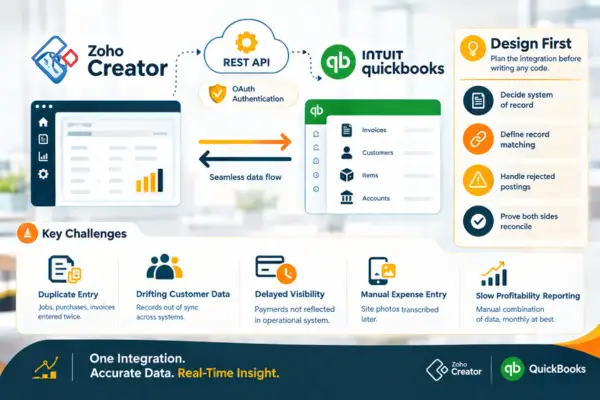
Businesses running QuickBooks for accounting frequently need operational applications QuickBooks was never intended to provide β job management, field service, project delivery, inspections, inventory beyond what QuickBooks tracks. Building those in Zoho Creator works well; the value depends on whether the two systems stay in agreement. Techvaria builds that integration with the design work done properly: defined field ownership, matched records, error handling, and reconciliation reporting so the connection is verifiable rather than assumed.
Home / Zoho Creator and QuickBooks Integration
Why QuickBooks Integration Requires Design Before Code?
QuickBooks Online exposes a well-documented REST API with OAuth authentication, which makes the technical connection from Creatorβs Deluge straightforward. What is not straightforward is everything the API does not decide for you.
QuickBooks enforces its own rules about what can be created and modified β an invoice with payments applied cannot be freely edited, a customer cannot be deleted once transactions exist, and closed accounting periods reject postings entirely. Its item, customer, and account lists must align with whatever your Creator application references, and that alignment is the thing that determines whether a posting succeeds or errors. Its sandbox behaves differently enough from production that testing must account for it. And QuickBooks Desktop is a different problem altogether β no cloud API, so integration requires a connector or middleware component running alongside the installation, which changes the architecture entirely. The projects that go badly are the ones that treat this as a generic REST integration and discover these constraints in production. The projects that go well decide, before writing anything, which system owns each field, how records are matched, what happens when a posting is rejected, and how the two sides are proven to agree.
Business Challenges We Solve
The problem is almost always duplicate entry and the lag it creates. A job is completed and recorded in the operational system, then invoiced separately in QuickBooks by someone reading the job record. A purchase is approved and received against a project, then entered again as a bill. Customer records exist in both places and drift apart, so an address updated in one is wrong in the other. Payments received are recorded in QuickBooks but not reflected in the operational system, so field or project staff have no visibility of whether a customer is paid up. Expenses captured on site are transcribed from photos into QuickBooks days later. Project profitability requires manually combining operational data with QuickBooks figures, which means it is produced monthly at best. The result is wasted administrative time, delayed information, and greater risk of inconsistent financial and operational records.
Whatβs Included?
The integration removes the duplication by making the operational capture the single point of entry. A Creator application records the work with the operational detail the business needs β job, site, technician, project, phase β and posts the financial consequence to QuickBooks as a properly structured invoice, bill, or expense against the correct customer, item, and account. In the other direction, QuickBooks customers, items, and outstanding balances are available in Creator so the operational application works against current financial data rather than a stale copy. Reconciliation reporting then shows what has posted, what is pending, and what failed, so the agreement between the two systems is demonstrable rather than a matter of trust.
Integration Design and Field Ownership
Before any code, we define which system is authoritative for each shared field and in which direction each record type flows β the decision that prevents most integration problems before they can occur.
QuickBooks API Connection and Authentication
OAuth connection to QuickBooks Online with token refresh handled automatically, or a middleware architecture where QuickBooks Desktop is in use, with connection health monitored rather than assumed.
Customer, Item, and Account Mapping
Explicit mapping between Creator records and QuickBooks customers, items, and chart of accounts, including how new records are created and which system is permitted to create them.
Invoice and Sales Receipt Creation
Invoices generated in QuickBooks from completed Creator jobs or milestones, with correct line items, tax treatment, terms, and reference back to the originating operational record.
Bill and Expense Posting
Supplier bills and expenses captured in Creator against a job or project and posted to QuickBooks with the correct account, class or location, and supporting document attached.
Payment and Balance Sync
Payment status and customer outstanding balances pulled from QuickBooks into Creator, so operational staff can see whether a customer is current before scheduling further work.
Error Handling, Retry, and Failure Queue
Every posting validated, failures logged with the QuickBooks error message and the full payload retained, held in a queue for correction and reposting, and alerted rather than lost.
Reconciliation Reporting
A comparison view of Creator transactions against posted QuickBooks entries β what has posted, what is pending, what failed β so the two systems can be proven to agree at any point.
Zoho Applications We Use for This
QuickBooks remains the financial system of record. Listed below are the Zoho applications working on the operational side of the connection.
Zoho Creator
The operational application, the Deluge integration logic, the failure queue, and reconciliation reporting

Zoho CRM
Where customer records originate and must align with QuickBooks customers for receivables and history

Zoho Inventory
Used where stock is managed operationally in Zoho while QuickBooks holds the financial position, requiring a defined boundary
Zoho Analytics
Reporting combining operational detail from Creator with financial data from QuickBooks

Zoho Flow
Scheduling and orchestration of routine sync runs where the logic does not warrant custom Deluge

Where This Applies?
This applies to businesses committed to QuickBooks for accounting with operational processes it cannot hold. Field service and trades businesses scheduling jobs, capturing work completed on site, and invoicing from it. Construction and contracting firms tracking project costs, subcontractor bills, and progress billing against QuickBooks. Professional services firms recording timesheets and project delivery and generating invoices from approved time. Equipment and installation businesses managing job workflows, warranty, and servicing alongside the sale. Property and facilities managers tracking maintenance work and recharging costs to owners or tenants.
It applies particularly where the business has no intention of leaving QuickBooks, which is the common case. The accounts team is fluent in it, the accountant works with it, and the reporting is established. The integration approach respects that: QuickBooks stays as the financial system of record and Creator handles the operational layer around it.
It also applies to businesses that started with a QuickBooks-adjacent app from its marketplace and found the fit inadequate. Marketplace apps solve common cases well; where the operational process is specific to the business β unusual job structures, particular approval requirements, industry documentation β a purpose-built Creator application integrated to the same QuickBooks file usually fits better and costs less over time than adapting the business to a marketplace product.
Ready to Stop Entering Everything Twice?
Why Choose Techvaria for QuickBooks Integration?
Techvaria is a Zoho Premium Partner building operational applications on Zoho Creator for businesses in India, the UAE, and international markets where QuickBooks is the accounting standard. We build these integrations with QuickBooksβ actual behaviour designed in β period locks, edit restrictions on transactions with payments applied, list alignment requirements, and token refresh β rather than discovering them after launch. Every integration includes failure handling and reconciliation reporting as standard, and we document the connection so it stays maintainable. We also map the data flow between systems carefully, defining which application owns each record and how changes are synchronised. This reduces duplicate entry, makes failures easier to identify, and gives teams greater confidence that operational and accounting data remain aligned as the business grows.
Hear From Our Clients
Industries We Serve
Frequently Asked Questions
QuickBooks Online is straightforward β it exposes a REST API with OAuth, and Creator connects to it directly from Deluge. QuickBooks Desktop has no cloud API, so integration requires a connector or middleware component running on the same network as the installation, relaying between Creator and the local QuickBooks file. Both are workable; the Desktop architecture is different and is scoped accordingly.
Yes, and most implementations are bidirectional. Operational transactions post from Creator to QuickBooks; customer, item, and balance data flows back so the operational application works against current financial information. The design work is defining which system owns each field so updates do not conflict, and implementing loop prevention so a sync in one direction does not trigger one back.
It is caught, logged with the QuickBooks error message and the full payload, held in a failure queue for review, and alerted. Common causes are a closed accounting period, a missing or mismatched customer or item, and validation rejections. The queue allows correction and reposting rather than the transaction being lost, which is what happens when integrations are built without one.
Through idempotency. Every posting carries a unique reference stored on both the Creator record and the QuickBooks transaction, and the integration checks for an existing match before creating. This matters because the most common duplicate cause is a retry after a timeout where the original posting actually succeeded β without the check, the retry creates a second invoice.
They need to be reliably mapped, which usually means aligning them. QuickBooks references customers, items, and accounts by its own identifiers, so the integration holds the mapping between those and your Creator records. Where lists have accumulated duplicates and inconsistent naming, cleaning them is part of the preparation and is worth doing properly β mapping quality determines posting reliability.
Yes, where those are configured in your QuickBooks file. Job, project, site, or department information carried on the Creator record maps to the corresponding QuickBooks dimension, so financial reporting by project or location is produced from the accounting system rather than assembled manually. This is one of the more commonly requested capabilities.
QuickBooks rejects postings into a closed period, and the integration handles that as a defined failure case rather than an error. The transaction is queued with a clear reason so your finance team can decide whether to post it to the current period or reopen the prior one. Handling this deliberately avoids the situation where month-end closing silently breaks the integration.
Two to five weeks for QuickBooks Online in most cases, depending on how many transaction types flow and whether the sync is one-way or bidirectional. QuickBooks Desktop adds time for the middleware architecture and network arrangement. List alignment is frequently the largest preparatory task and can extend the calendar independently of the build.