
Odoo 13 → 14 → 15 Migrations
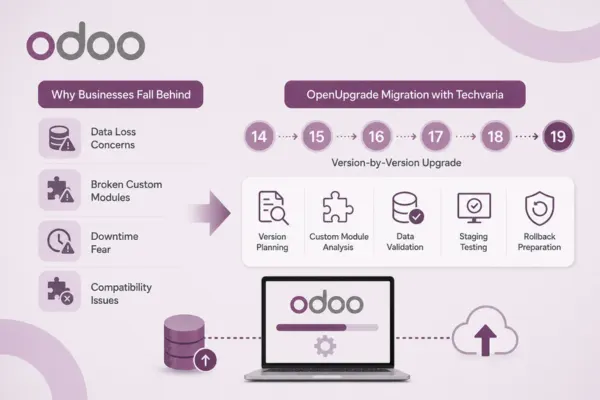
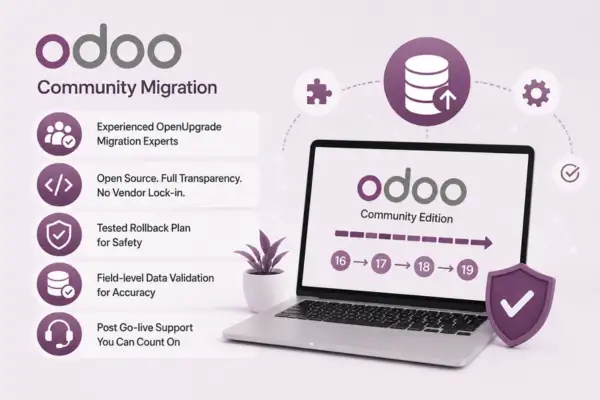
Covers the "accounting apocalypse" restructuring introduced in v13, where the entire accounting module was rebuilt — one of the most complex migration paths in Odoo's history, requiring careful reconciliation of journal entries and chart of accounts data.
Odoo 15 → 16 → 17 Migrations
Handles the UI framework changes, updated inventory valuation logic, and revised sales/purchase workflows introduced across these releases, with particular attention to custom views built against the older OWL framework.
Odoo 17 → 18 → 19 Migrations
Covers the latest structural changes to studio-built customizations, automation rules, and API deprecations, ensuring custom integrations continue to function after the upgrade.
Legacy Odoo 8–12 Migrations
For businesses still running significantly older Community versions, we plan the full multi-hop migration sequence, factoring in the compounding schema changes across five or more version jumps.
We have recently engaged Techvaria for our Zoho implementation needs, and the experience exceeded our expectations. The team demonstrated a deep understanding of our requirements and provided tailored solutions....

Our experience with Techvaria as a tech partner for Aster Health Academy has been outstanding. Their team consistently goes above and beyond, delivering customized tech solutions that have greatly improved our ....

Techvaria team has been extremely professional in implementing Zoho suite of products at my office. In all the steps, through consultation, customization, support and maintenance aspects, Techvaria has been an able partner....

Propleader had a fantastic experience with Techvaria. They're real Zoho pros who made sure our Zoho setup went super smoothly. It's made a huge difference to our business! What's great is how they nailed our unique....

We engaged Techvaria as our implementation partner for our Zoho setup, and the experience has been excellent. Our requirements were thoroughly understood, and they recommended the most appropriate Zoho products to meet our needs. Their team was highly professional in their coordination and assigned experienced members who ensured smooth execution throughout the project. The project plan was clearly communicated at every stage, and timelines were well adhered to. After this successful implementation, we feel very confident in Zoho products and are already working on expanding the scope with additional Zoho solutions to further streamline our internal processes. Overall, we are very satisfied with Techvaria’s expertise, professionalism, and commitment, and would gladly recommend them for any Zoho implementation.

I would like to thank Techvaria Odoo team for the pleasant collaboration. I truly appreciate team commitment and direct availability – it really makes a difference. It’s a pleasure to work with people who are approachable and engaged. I’m looking forward to expanding our collaboration even further!

At Tasis Tech, we hold a very high bar when it comes to delivering Odoo projects — from understanding client requirements to documentation and quality delivery. Working with Techvaria has been a genuinely smooth and valuable experience. Their team not only understands the technical side but also has a strong grasp of business processes, which is rare to find. Their Odoo expertise is exceptional, and what I appreciate most is their ability to align with our delivery standards without needing constant follow-up. It feels more like working with an extension of our own team, rather than an external vendor. Looking forward to more successful collaborations ahead.

We recently worked with Techvaria on the implementation of the Odoo ERP software, and the entire experience was excellent. Techvaria team demonstrated deep expertise and a strong understanding of the Odoo platform, guiding us through every step of the implementation process. From initial planning and customization to deployment and training, they provided clear communication, valuable insights, and practical solutions tailored to our business needs. Their ability to troubleshoot challenges and offer proactive advice made a complex transition feel smooth and manageable without having to develop custom modules.I highly recommend recommend Techvaria to any business looking for a knowledgeable and reliable partner for Odoo ERP implementation.

As an Odoo Partner myself, I sometimes have to admit I don't understand something. This is usually when we see complicated configurations and accounting. In these cases I just turn it over to Techvaria. TV's experts in Odoo accounting and configuration is second to none/ Anyone who gets stuck and needs people with the skill of a Forensic Accountant should be looking at Techvaria for help! Every instance I have had issues with they have figured out and corrected very quickly, and for a very reasonable cost. Very easy to communicate with too.

As an implementation partner, we’ve found Techvaria’s response times outstanding and their technical expertise invaluable. Their proactive support has saved us significant time and helped fast-track our projects - highly recommended!
We’ve been working with Techvaria Solutions Pvt. Ltd., and it’s been a great experience! Mustafa, in particular, has been awesome to work with—very knowledgeable, responsive, and easy to communicate with. Highly recommend their team! one of the best 😊🏁

We partnered with Techvaria for our Zoho One onboarding and implementation, covering Zoho CRM, Books, People, and Payroll. The Techvaria team demonstrated exceptional professionalism and domain understanding, tailoring the system precisely to our fintech operations.
Their proactive approach in automation, training, and support helped us streamline internal processes — from lead management to payroll compliance — all within the Zoho ecosystem.
We truly appreciate the Techvaria team’s dedication, quick turnaround, and commitment to ensuring a smooth go-live experience.
Highly recommend Techvaria as a trusted Zoho Implementation Partner for any growing fintech organization.

It has been very Positive Experience with Techvaria, their team has been very supportive in developing our Logistics Software. Team has been has got good experience and support from them is excellent.
We highly recommend them.

Our experience with Techvaria Solutions has been excellent. They quickly understood our business challenges and built practical, user-friendly digital solutions that improved how we manage inventory, storage, and customer operations.
Their team is responsive, technically strong, and easy to work with. What stands out is their ability to turn ideas into working systems that actually solve real problems. Thanks to Techvaria, we now have better visibility, smoother workflows, and a more connected operation. I would confidently recommend them to anyone looking for a reliable technology partner.