Procurement Is Not Just Buying — It Is Controlling Cost
Every rupee or dirham saved in procurement flows directly to the bottom line. Yet in many growing businesses, procurement is still managed through email threads, WhatsApp messages to suppliers, spreadsheet trackers for purchase orders, and manual invoice matching at month-end.
The operational cost of this approach goes beyond the time wasted. Uncontrolled procurement leads to duplicate orders, missed volume discounts, supplier over-invoicing that goes undetected, and stock arriving too late — or too early — to support production or sales commitments.
Odoo’s Purchase module is a full procurement management platform integrated natively with inventory, accounting, and manufacturing. It covers every stage of the procurement cycle — from the moment a need is identified to the point a vendor invoice is matched and approved for payment — with automation that removes manual steps and controls that prevent costly errors.
This guide walks through the complete Odoo Purchase module functionality, including the workflows that operations managers, procurement heads, and finance teams need to understand before evaluating or implementing the platform.
The Procurement Problems Odoo’s Purchase Module Solves
- Purchase orders raised verbally or by WhatsApp, with no formal record or approval trail
- Vendor invoices paid without verifying against the original purchase order or goods received
- No visibility into outstanding POs or delivery commitments from suppliers
- Procurement happens reactively — when stock runs out — rather than proactively on reorder schedules
- No systematic vendor performance tracking — price, quality, and delivery reliability are not measured
- Discounts negotiated with preferred suppliers are not enforced consistently at the point of ordering
- Finance teams spend days reconciling vendor invoices against delivery records at month-end
Businesses that implement structured procurement workflows through ERP reduce purchase-related payment errors by an average of 34% and cut procurement cycle time by 28%, according to a 2024 Ardent Partners Procurement Report.
Odoo Purchase Module: Core Workflow Overview
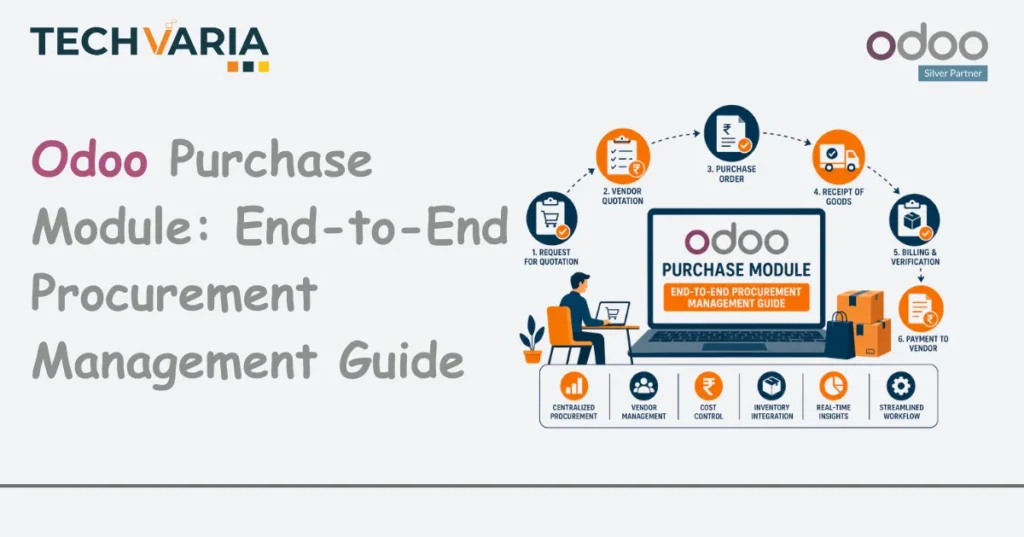
Odoo’s Purchase module follows the standard procurement lifecycle, with automation and controls built into each stage:
- Need identification — reorder rule, manufacturing order, or manual requisition
- Request for Quotation (RFQ) — sent to one or multiple vendors
- Vendor quotation comparison — side-by-side price and lead time analysis
- Purchase Order (PO) confirmation — with approval workflow if required
- Goods receipt — received against PO in Odoo Inventory
- Vendor invoice — matched against PO and goods receipt (three-way match)
- Payment — released after match approval in Odoo Accounting
Every step is tracked, time-stamped, and visible to relevant stakeholders — creating a complete procurement audit trail without any additional administration.
Request for Quotation (RFQ) Management
Creating and Sending RFQs
An RFQ in Odoo can be created:
- Manually by a procurement team member for a specific requirement
- Automatically by Odoo’s reorder rules when stock falls below the minimum level
- Automatically from a Manufacturing Order when components need to be sourced externally
Each RFQ specifies the product, quantity, required delivery date, and preferred vendor. Odoo can send the RFQ directly to the vendor via email from within the platform — with the vendor’s quoted price returned and recorded against the RFQ record.
Multi-Vendor RFQ and Quotation Comparison
For larger purchases or commodity items where pricing varies significantly between vendors, Odoo allows a single RFQ to be sent to multiple vendors simultaneously. When vendor quotations are returned:
- All responses are consolidated in Odoo’s RFQ comparison view
- Price per unit, total cost, and promised delivery date are displayed side by side
- The procurement team selects the winning vendor and converts the RFQ to a Purchase Order with a single click
- Non-selected vendor RFQs are automatically archived
Tip: Use Odoo’s Pricelists feature in conjunction with the Purchase module to lock in negotiated vendor prices. When a preferred vendor pricelist is active, Odoo automatically applies contracted pricing when raising RFQs — preventing off-contract purchases.
Purchase Order Management
PO Approval Workflows
Odoo’s Purchase module supports configurable approval workflows based on order value:
- POs below a defined threshold are auto-approved and sent directly to the vendor
- POs above the threshold require manager approval before being transmitted
- Multi-level approvals can be configured for very large orders — department head approval followed by CFO approval
Approval notifications are sent automatically via Odoo’s chatter system. Approvers receive an email with a direct link to the PO, can review it, and approve or reject with a note — all within the Odoo interface.
PO Tracking and Status Visibility
Once a PO is confirmed and sent, Odoo tracks its status continuously:
- Quantities ordered vs. quantities received — updated in real time as deliveries are recorded
- Promised delivery date vs. actual delivery date — feeding vendor performance metrics
- Outstanding PO value — visible to finance teams for cash flow planning
- PO aging — identifying POs where delivery is overdue and follow-up is required
This real-time visibility eliminates the ‘chasing the supplier’ phone calls that procurement teams make because they have no visibility into outstanding orders. The status is simply visible in Odoo.
Partial Deliveries and Backorders
Vendors do not always deliver complete quantities. Odoo handles partial deliveries through its backorder management:
- When a partial delivery is received, Odoo records the received quantity and automatically creates a backorder for the outstanding balance
- The backorder is visible in the open delivery schedule
- The purchase order status reflects the partial receipt — ensuring that the remaining quantity is tracked to completion
Vendor Management in Odoo Purchase
Vendor Pricelists and Minimum Order Quantities
Odoo maintains a vendor master that records, per vendor and per product:
- Negotiated unit price at different quantity breaks
- Minimum order quantity (MOQ)
- Standard lead time for delivery
- Currency of supply (for international vendors)
When a PO or RFQ is created for a product, Odoo automatically applies the correct vendor price based on the order quantity — enforcing negotiated pricing without requiring the procurement team to look it up manually.
Vendor Performance Tracking
Odoo records actual delivery performance against promised delivery dates and receives quality signals through its integration with the Inventory and Quality modules:
- On-Time Delivery Rate: percentage of PO lines delivered on or before the promised date
- Lead Time Accuracy: actual lead time vs. quoted lead time per vendor
- Return Rate: goods returned to the vendor as a proportion of goods received (linked to quality alerts)
This data enables procurement teams to make evidence-based vendor selection decisions — prioritising reliable suppliers over those who offer marginally better prices but deliver inconsistently.
Three-Way Matching: Controlling the Payment Gate
Three-way matching is the process of verifying that a vendor invoice matches both the original purchase order and the goods receipt before payment is released. It is the primary control against vendor over-invoicing, duplicate billing, and payment for goods never received.
In Odoo, three-way matching works as follows:
- Vendor invoice is entered in Odoo Accounting, referencing the originating PO.
- Odoo automatically pulls the PO quantities and prices for comparison.
- The goods receipt quantities are matched against the invoice.
- If quantities and prices match within defined tolerances — the invoice is flagged for payment.
- If discrepancies exist — the invoice is flagged for review, and a workflow notifies the procurement team.
Tip: Configure billing policies per vendor — ‘Ordered Quantities’ for service vendors (where payment is based on order, not delivery) and ‘Received Quantities’ for goods vendors (where payment only triggers on confirmed receipt). This ensures the matching logic matches the commercial relationship.
Automated Reordering: Procurement on Autopilot
For businesses with well-defined inventory needs — manufacturers sourcing regular components, distributors maintaining stock levels, retailers managing standard SKUs — Odoo’s reorder rules can automate purchase order creation entirely.
Reorder rules define, per product per location:
- Minimum stock quantity (trigger point)
- Maximum stock quantity (reorder-to quantity)
- Preferred vendor
- Lead time consideration
When stock falls below the minimum, Odoo creates a draft RFQ to the preferred vendor automatically. The procurement team reviews and confirms — or sets the rule to fully automated confirmation for trusted vendors. The result is a procurement process that responds to actual consumption rather than manual monitoring.
Odoo Purchase Integration with Other Modules
| Integration | What It Enables |
|---|---|
| Purchase → Inventory | Confirmed POs create incoming delivery records. Goods received update stock instantly. |
| Purchase → Accounting | POs feed into landed cost calculation. Vendor invoices linked to POs for three-way match. |
| Purchase → Manufacturing | Manufacturing orders automatically trigger purchase RFQs for components not in stock. |
| Purchase → Quality | Incoming goods can be routed to quality inspection before stock is updated. |
| Purchase → Expenses | Employee expense claims can trigger purchase requisitions for approval. |
Comparison: Odoo Purchase vs. Manual Procurement
| Process Step | Manual Approach | Odoo Purchase Module |
|---|---|---|
| Need Identification | Email or verbal request | Automatic reorder rule or linked Manufacturing Order |
| RFQ to Vendor | Email (no record) | Formal RFQ sent and tracked from Odoo |
| Vendor Comparison | Spreadsheet | Side-by-side comparison in Odoo UI |
| PO Approval | Email chain | Configurable workflow with automatic notifications |
| Delivery Tracking | Phone calls to vendor | Real-time PO status in Odoo |
| Invoice Matching | Manual spreadsheet reconciliation | Automated three-way match with exception flagging |
| Vendor Performance | Not measured | Tracked automatically: OTD, lead time, return rate |
| Audit Trail | Email archives (incomplete) | Complete, time-stamped record in Odoo |
Best Practices for Odoo Purchase Implementation
- Build your vendor master data carefully before go-live — vendor pricelists, lead times, and MOQs must be accurate for the module to add value from day one.
- Configure purchase approval thresholds that reflect your actual authorisation matrix — not a generic template.
- Set up reorder rules for your highest-volume, most critical SKUs first — these deliver the most immediate operational benefit.
- Train procurement staff on the RFQ workflow, not just PO entry — the discipline of formal vendor communication is a culture change for many teams.
- Review vendor performance reports quarterly — use the data in supplier negotiations and preferential routing decisions.
- Connect Purchase to Inventory and Accounting from day one — the three-way match only works when all three modules are active.
Conclusion
Procurement is one of the highest-leverage areas for operational improvement in any product-based business. Every step of the procurement cycle — from need identification to vendor payment — has a cost and a risk when managed manually. Odoo’s Purchase module removes the manual steps, enforces the controls, and creates the visibility that procurement, operations, and finance teams all need to function effectively together.
The platform’s integration with Inventory, Manufacturing, Quality, and Accounting means that procurement does not operate in isolation — it is connected to every upstream and downstream process it touches. That connectivity is what transforms procurement from a tactical, reactive function into a strategic, data-driven capability.
Planning a similar project? See our Odoo implementation services and Odoo customization services.

Mustufa Rahi is an Odoo Certified Functional Consultant and ERP expert at Techvaria with 15+ years of experience in implementation, automation, and business process optimization, helping organizations scale efficiently.